Analog Clock Worksheet App That Grades and Finds Patterns
"Three fifty." My daughter looked at the clock, looked at me, and said "four fifty" without a flicker of doubt. The hour hand was sitting almost on the four, so to her it was four. I explained. She nodded. Two problems later she did it again. That evening I went looking for an analog clock worksheet with only that kind of problem on it, and found a pile of PDFs that each had two of them buried among thirty easy ones.
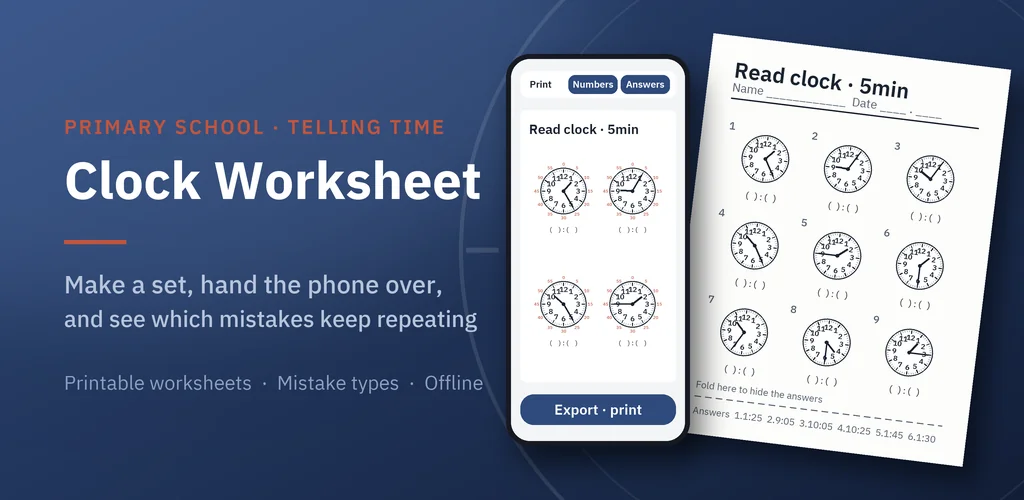
So I built a generator instead of downloading another sheet. You choose the level, it makes the problems, your child solves them on your phone, and when they are done you get back not just a score but a list of what went wrong and how often. If you want paper, it prints.
▶ Get it on Google Play (free): https://play.google.com/store/apps/details?id=com.thefacegood.clockdrill
Why I stopped downloading analog clock worksheet PDFs
Free printable analog clock worksheets are everywhere, and they are all slightly wrong for the child in front of you. Too many o'clock problems when you need five-minute practice. Elapsed-time questions when you have not covered that yet. Twelve problems when you wanted six, or forty when you wanted ten. And every sheet is a one-off, so once it is solved you are back to searching.
The thing I actually needed was not a better worksheet. It was a way to make the exact one I needed, in ten seconds, as many times as it took.
Pick a unit and a type, then hand the phone over
Setup is two choices. The unit: whole hours, half hours, five minutes, or single minutes. The type: read the clock, or elapsed time, where the question is "what time is it 37 minutes after this". Elapsed time follows the unit, so a whole-hour set asks "three hours later" and a one-minute set asks "37 minutes later". Then the number of problems. Minute numbers around the dial can be switched on while the concept is new and off once it is not.
Before you hand the phone over, one sample problem is shown with the current settings, so you know what your child is about to see.
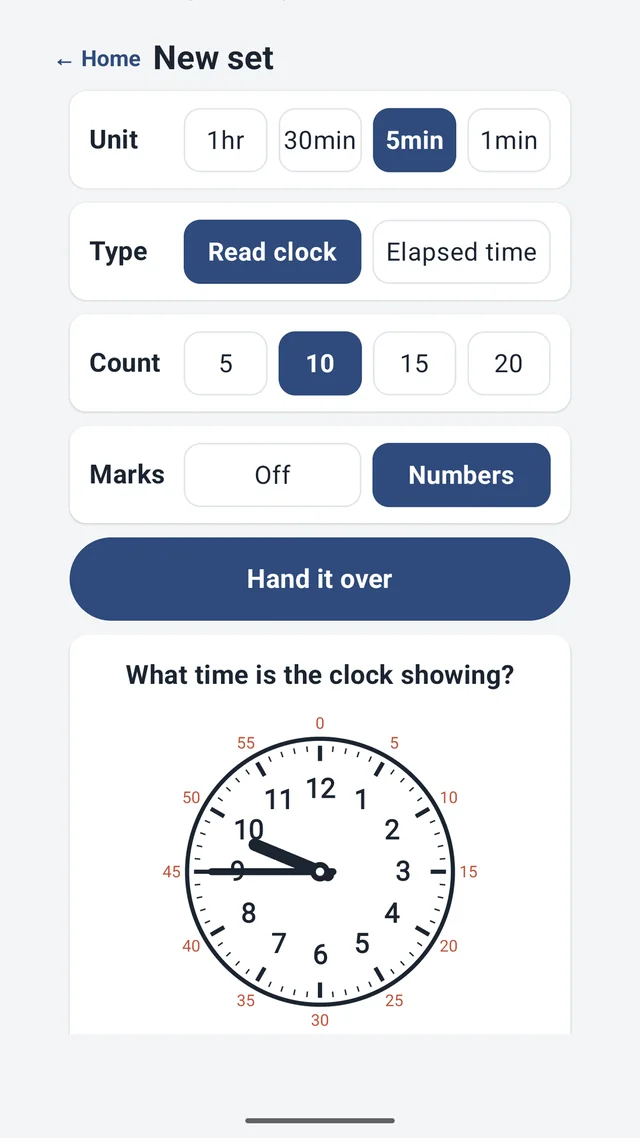
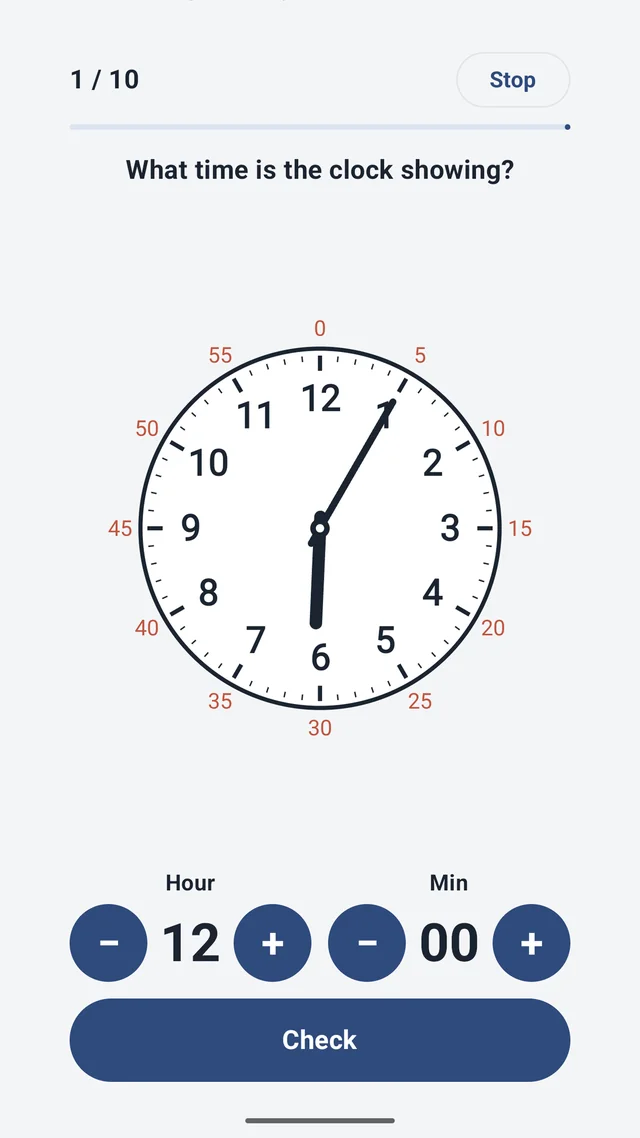
The solving screen has no keyboard. You enter an answer by tapping big plus and minus controls, one pair for hours and one for minutes, because for a seven-year-old a number keypad is harder than the clock itself, and I did not want typing skill to pollute the result. There are also no ads on that screen. A child's hands are on it, so it stays clean.
The grade is not the point. The mistake type is
A score by itself tells you almost nothing you did not already know. What matters is which mistakes keep repeating. So every wrong answer is compared with the correct time and sorted into a cause:
- Hour and minute hands swapped
- Hour hand misread, the 3:50-as-4:50 mistake, which is by far the most common
- Just-before-the-hour misread, 2:55 read as 3:55
- Miscounting by fives, landing one mark off
- Elapsed-time errors, usually getting stuck where sixty minutes rolls over into an hour
The results screen shows the grade and then the breakdown, and it lets you generate a new set aimed at just one mistake type. The records build up over sessions, so what you see is not today's score but the shape of the last several attempts.
That breakdown is how I found out my daughter's problem was not five-minute counting in general. It was counting past the seven, eight and nine. Everything below that she got. From then on we practised only that arc, with sets generated for exactly that.
When you still want paper
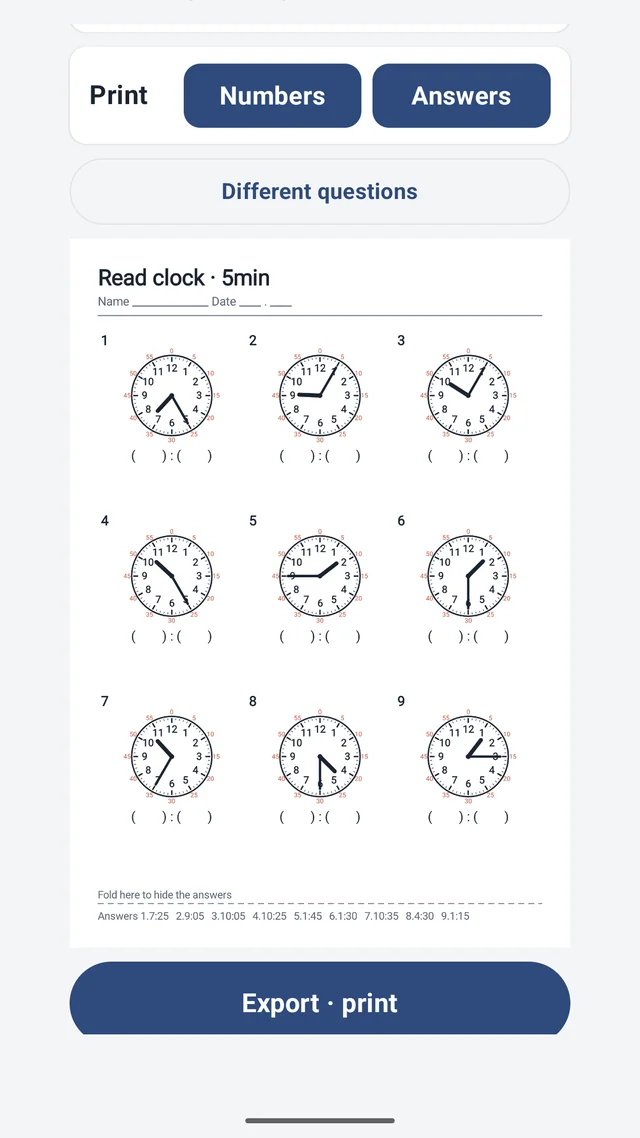
Any set can be exported as a single-page image and printed or sent in a message. Three columns, numbered problems, a space to write each answer, and the answer key on the bottom line with a fold mark so you can hide it. If it is for a class or a test, the answer key can be left off entirely. This is the part that replaced the PDF hunt: a printable analog clock worksheet that matches exactly what we were practising that day.
What it does not do, on purpose
It does not teach. There are no cartoons, no rewards, no character telling your child they did great. It assumes the teaching happens between you and the child, and it does the boring part: generating, grading, counting. The level order follows the telling-time unit in the Korean primary curriculum, but the clocks themselves are the same everywhere, so it works in any language the app supports.
No account, no sign-in, nothing sent to a server. It asks for an optional notification permission and nothing else. Accuracy records and mistake types live only on your phone and can be wiped at any time. The parent-side screens carry a banner ad and a full-screen ad when you generate or export a set. The solving screen has none.
Who this is for
- Parents whose child reads the clock fine, except for that one mistake that keeps coming back
- Anyone who has printed the same telling-time worksheets for kids three times because nothing else fit
- Tutors and teachers who want a fresh sheet per child rather than one sheet per class
- Parents who want to see progress across weeks, not just a score tonight
- Anyone teaching a child to tell time who wants the grading done for them
Download (Google Play, free): https://play.google.com/store/apps/details?id=com.thefacegood.clockdrill
※ This is an independent app with no ties to any school board or education authority. Every child progresses differently, and the mistake categories exist to guide practice, not to diagnose anything.
If there is a mistake type I have not caught, or a level your child needs that is not there, leave a review. The categories list came from watching one child, and I would like it to cover more than one.


Comments
Post a Comment